
Cloud Computing for Small Business Growth: 7 Revolutionary Ways to Transform Your Operations in 2025
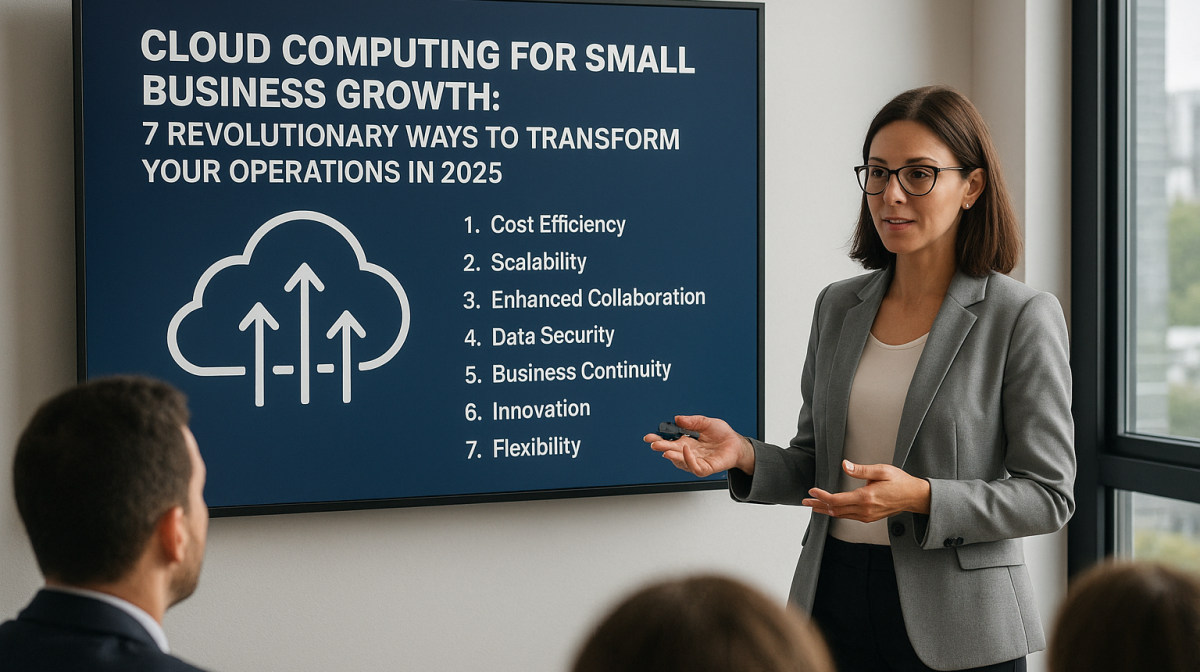
Table of Contents
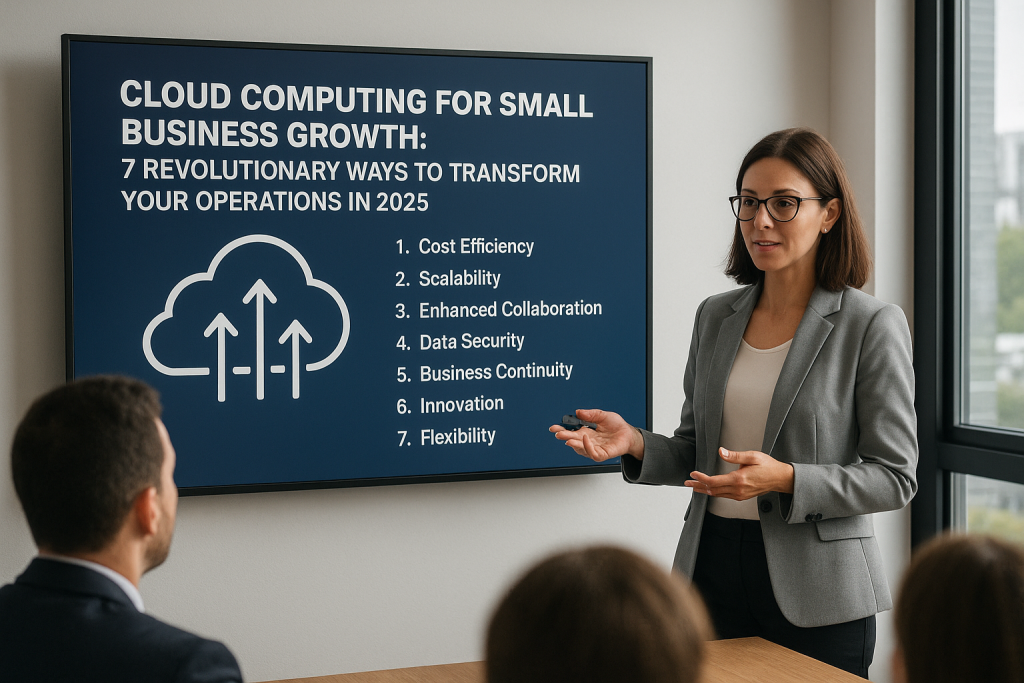
Cloud computing for small business growth has become the cornerstone of digital transformation, enabling companies to reduce operational costs by up to 40% while increasing scalability and productivity. In 2024, 92% of businesses now leverage cloud services, with small and medium enterprises storing 60% of their data in the cloud.
This comprehensive guide reveals how cloud computing revolutionizes small business operations, from enhancing collaboration to enabling data-driven decision making, positioning your business for accelerated growth in an increasingly competitive marketplace.
Understanding Cloud Computing for Small Business Growth
Cloud computing for small business growth represents a paradigm shift from traditional IT infrastructure to flexible, internet-based computing resources. Instead of investing in expensive hardware and software, businesses access computing power, storage, and applications through internet-connected services.
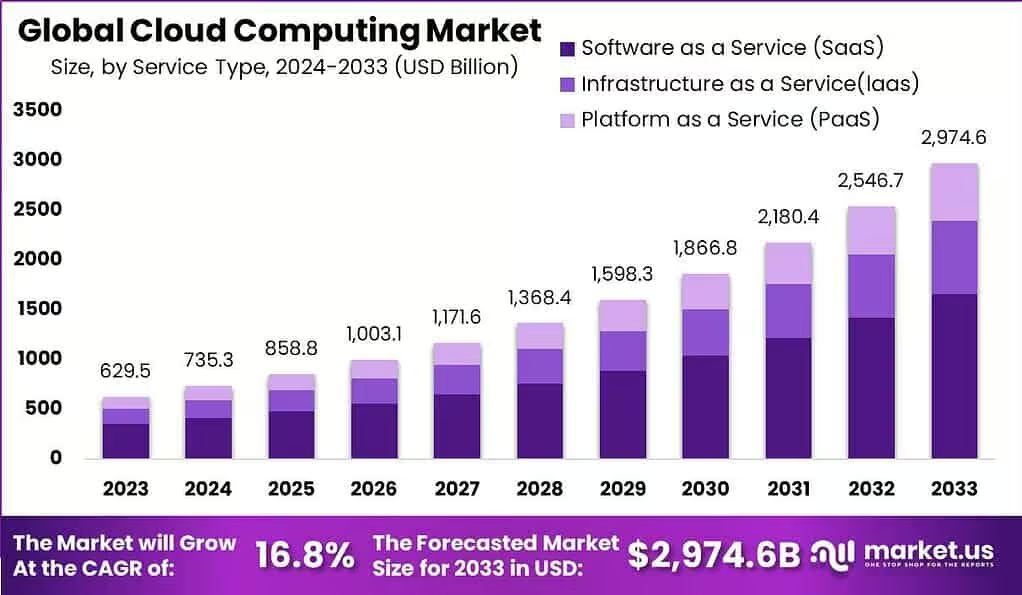
The cloud computing market has experienced explosive growth, with a compound annual growth rate (CAGR) of 16.3% projected through 2026. This growth is primarily driven by small businesses recognizing cloud computing’s transformative potential for operational efficiency and competitive advantage.
Key Cloud Service Models
Software as a Service (SaaS): Applications delivered over the internet, eliminating the need for local installation and maintenance. Popular examples include Microsoft 365, Salesforce, and QuickBooks Online.
Platform as a Service (PaaS): Development platforms that enable businesses to build, deploy, and manage applications without worrying about underlying infrastructure complexity.
Infrastructure as a Service (IaaS): Virtualized computing resources including servers, storage, and networking, providing the foundation for scalable business operations.
The Current State of Cloud Adoption Among Small Businesses
Recent industry data reveals remarkable trends in cloud adoption among small businesses. According to 2024 research, small and medium-sized businesses are leading cloud adoption, with 61% of workloads now running in public clouds. This represents a significant shift from just five years ago when cloud computing for small business growth was considered a luxury rather than a necessity.
Industry-Specific Adoption Patterns
Different industries are embracing cloud computing at varying rates:
- Professional Services: 95% adoption rate
- Technology Companies: 98% adoption rate
- Retail and E-commerce: 88% adoption rate
- Manufacturing: 82% adoption rate
- Healthcare: 79% adoption rate (with growing emphasis on compliance)
The pandemic accelerated cloud adoption across all sectors, making remote work capabilities and digital collaboration essential for business survival and growth.
7 Revolutionary Benefits of Cloud Computing for Small Businesses
1. Dramatic Cost Reduction and Operational Efficiency
Cloud computing for small business growth delivers immediate cost benefits by eliminating capital expenditures on hardware, software licenses, and IT infrastructure. Businesses typically experience 20-40% cost reductions in their first year of cloud adoption.
Traditional IT Costs vs. Cloud Computing:
- Hardware purchases and maintenance: Eliminated
- Software licensing fees: Reduced by up to 60%
- IT staff requirements: Decreased by 30-50%
- Energy consumption: Lowered by 70%
2. Unprecedented Scalability and Resource Flexibility
Cloud infrastructure adapts to business needs in real-time. During peak seasons or rapid growth phases, resources scale automatically without requiring additional hardware investments or lengthy procurement processes.
3. Enhanced Data Security and Compliance
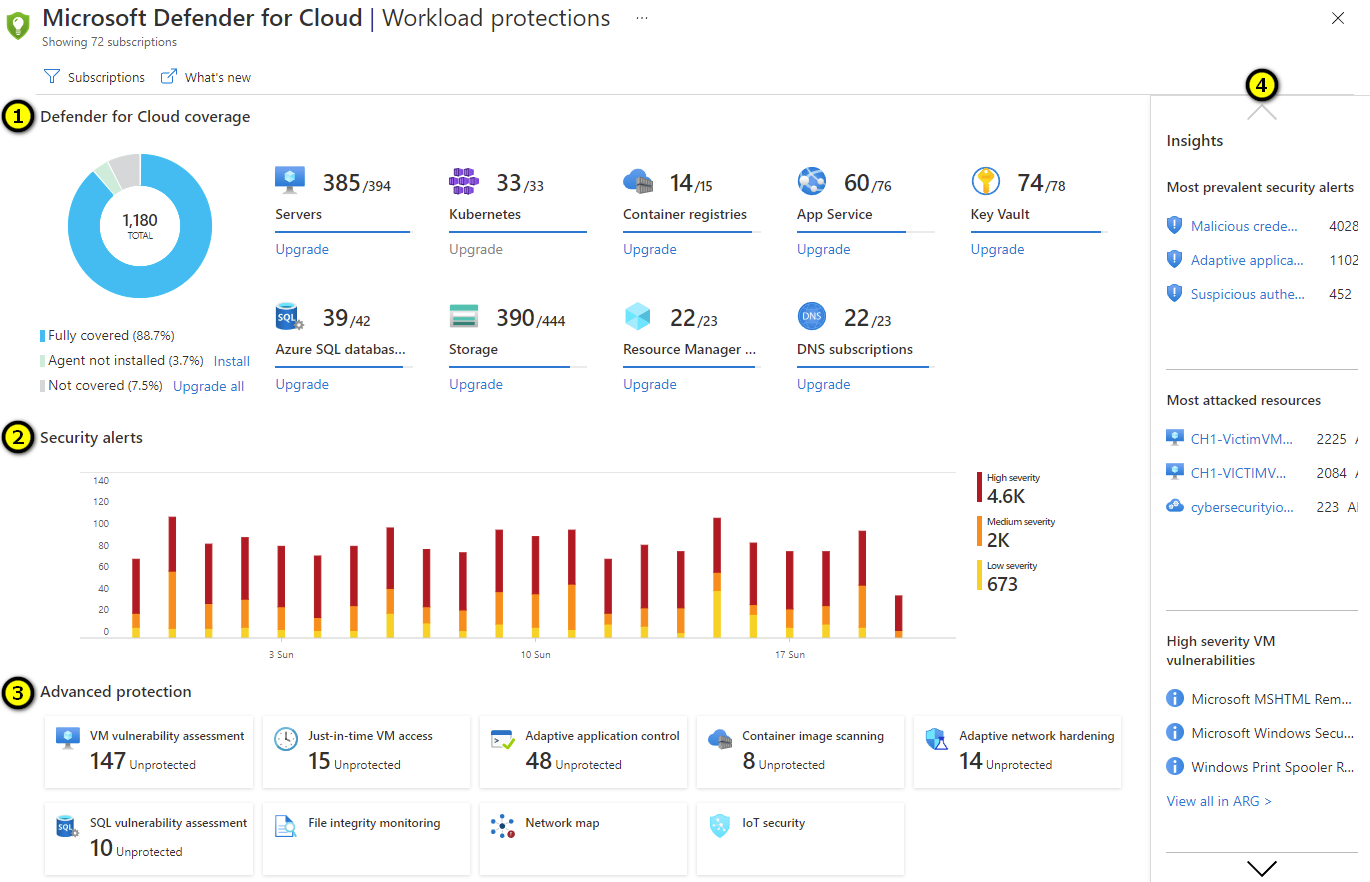
Contrary to common misconceptions, cloud computing often provides superior security compared to on-premises solutions. Major cloud providers invest billions in security infrastructure, offering enterprise-grade protection that small businesses couldn’t afford independently.
4. Improved Collaboration and Productivity
Cloud-based tools enable seamless collaboration regardless of geographical location. Teams can work simultaneously on documents, access shared resources, and maintain project continuity across different devices and time zones.
5. Automatic Updates and Maintenance
Cloud providers handle software updates, security patches, and system maintenance automatically, ensuring businesses always operate with the latest features and security protections without IT intervention.
6. Disaster Recovery and Business Continuity
Cloud computing provides robust backup and recovery capabilities, ensuring business operations continue even during unexpected disruptions. Data redundancy across multiple geographic locations protects against local disasters.
7. Access to Advanced Technologies
Small businesses gain access to cutting-edge technologies like artificial intelligence, machine learning, and advanced analytics through cloud platforms, leveling the playing field with larger competitors.
Cost-Effectiveness: The Financial Game-Changer
Cloud computing for small business growth transforms financial planning from capital expenditure (CapEx) to operational expenditure (OpEx) models. This shift provides several advantages:
Immediate Financial Benefits
Reduced Initial Investment: Traditional IT infrastructure requires substantial upfront costs ranging from $50,000 to $200,000 for small businesses. Cloud computing eliminates these barriers with pay-as-you-go pricing models.
Predictable Monthly Costs: Cloud services provide transparent, predictable pricing, enabling better budget planning and cash flow management.
Elimination of Hidden Costs: No more surprise expenses for hardware failures, software upgrades, or emergency IT support.
Long-term Financial Impact
Studies indicate that businesses implementing cloud computing for small business growth achieve:
- 25-50% reduction in IT operational costs
- 35% improvement in IT staff productivity
- 20% faster time-to-market for new services
- 15-25% increase in overall business efficiency
Scalability and Flexibility in the Digital Age
Modern business environments demand agility and responsiveness. Cloud computing for small business growth provides unprecedented scalability options that adapt to changing business requirements without infrastructure constraints.
Horizontal and Vertical Scaling
Horizontal Scaling: Adding more resources to handle increased workload during peak periods, such as holiday sales or marketing campaigns.
Vertical Scaling: Upgrading existing resources to accommodate growing business needs, such as increased storage or processing power.
Real-World Scalability Examples
A small e-commerce business experiencing seasonal fluctuations can automatically scale computing resources during Black Friday sales, ensuring website performance remains optimal while controlling costs during slower periods.
Enhanced Security and Data Protection
Security concerns often prevent small businesses from adopting cloud computing, but modern cloud platforms provide superior protection compared to traditional on-premises solutions.
Multi-Layered Security Architecture
Cloud providers implement comprehensive security measures:
Physical Security: Biometric access controls, 24/7 monitoring, and redundant power systems protect data centers.
Network Security: Advanced firewalls, intrusion detection systems, and encrypted data transmission secure network communications.
Application Security: Regular security audits, vulnerability assessments, and automated threat detection protect applications and data.
Data Encryption: End-to-end encryption protects data both in transit and at rest, ensuring confidential information remains secure.
Compliance and Regulatory Benefits
Cloud platforms often achieve industry certifications and compliance standards that would be expensive for small businesses to obtain independently:
- SOC 2 Type II compliance
- GDPR compliance
- HIPAA compliance (for healthcare businesses)
- PCI DSS compliance (for payment processing)
Collaboration and Remote Work Capabilities
The global shift toward remote and hybrid work models has made cloud computing essential for business continuity. Cloud computing for small business growth enables seamless collaboration regardless of physical location.
Modern Collaboration Features
Real-time Document Collaboration: Multiple team members can edit documents simultaneously, with automatic version control and change tracking.
Video Conferencing Integration: Built-in communication tools facilitate face-to-face meetings and screen sharing capabilities.
Project Management Integration: Cloud-based project management tools provide transparency and accountability across distributed teams.
Mobile Accessibility: Team members can access business applications and data from smartphones and tablets, ensuring productivity anywhere.
Productivity Metrics
Organizations implementing comprehensive cloud collaboration solutions report:
- 30% reduction in project completion times
- 45% improvement in team communication efficiency
- 25% increase in employee satisfaction with remote work capabilities
- 20% reduction in travel and office space costs
Business Continuity and Disaster Recovery
Traditional disaster recovery solutions are often too expensive and complex for small businesses. Cloud computing for small business growth provides enterprise-level business continuity capabilities at affordable prices.
Automatic Backup and Recovery
Cloud platforms automatically backup data across multiple geographic locations, ensuring business operations can continue even during local disasters, power outages, or hardware failures.
Recovery Time Objectives (RTO) and Recovery Point Objectives (RPO)
RTO: The maximum acceptable downtime before business operations resume. Cloud solutions typically achieve RTOs of 1-4 hours compared to 24-72 hours for traditional solutions.
RPO: The maximum acceptable data loss during a disaster. Cloud backup systems can achieve RPOs of less than 15 minutes, minimizing potential data loss.
Cloud Computing Implementation Strategy
Successfully implementing cloud computing for small business growth requires strategic planning and phased execution. A well-structured approach ensures smooth transition while maximizing benefits and minimizing disruption.
Phase 1: Assessment and Planning (Weeks 1-4)
Current Infrastructure Audit: Evaluate existing IT systems, applications, and data to identify cloud migration candidates.
Business Requirements Analysis: Determine specific business needs, performance requirements, and compliance considerations.
Cloud Strategy Development: Choose appropriate cloud service models (SaaS, PaaS, IaaS) and deployment strategies (public, private, hybrid).
Phase 2: Initial Migration (Weeks 5-12)
Pilot Project Selection: Begin with non-critical applications to test cloud capabilities and refine processes.
Data Migration Planning: Develop comprehensive data transfer strategies ensuring minimal downtime and data integrity.
Staff Training Initiation: Begin employee education on new cloud-based tools and procedures.
Phase 3: Full Implementation (Weeks 13-24)
Complete System Migration: Transfer remaining applications and data to cloud infrastructure.
Integration and Optimization: Ensure seamless integration between cloud and remaining on-premises systems.
Performance Monitoring: Implement monitoring tools to track system performance and user satisfaction.
Phase 4: Optimization and Expansion (Ongoing)
Continuous Improvement: Regular assessment of cloud performance and cost optimization opportunities.
Advanced Feature Adoption: Gradual implementation of advanced cloud capabilities like AI and analytics.
Security Review: Ongoing security assessment and enhancement procedures.
How Digimara Technology Accelerates Your Cloud Journey
Located in Rockwall, Texas, Digimara Technology specializes in guiding small businesses through successful cloud transformations. Our comprehensive approach ensures maximum return on cloud computing investments while minimizing implementation risks.
Digimara’s Proven Cloud Implementation Methodology
1. Strategic Assessment: Comprehensive evaluation of current IT infrastructure and business objectives to develop customized cloud strategies.
2. Solution Design: Creation of tailored cloud architecture incorporating security, scalability, and cost optimization requirements.
3. Managed Migration: Expert-led migration process ensuring zero data loss and minimal business disruption.
4. Ongoing Support: 24/7 monitoring and support services to maintain optimal cloud performance.
5. Continuous Optimization: Regular reviews and adjustments to maximize cloud benefits and cost efficiency.
Client Success Stories
Local Manufacturing Company: Achieved 35% cost reduction and 50% improvement in order processing speed within six months of cloud implementation.
Professional Services Firm: Enabled 100% remote work capability during the pandemic while maintaining full operational capacity.
Retail Business: Implemented cloud-based inventory management resulting in 25% reduction in stockouts and 20% improvement in cash flow.
Digimara’s Cloud Service Portfolio
- Cloud strategy consulting and planning
- Infrastructure assessment and migration
- Security implementation and compliance
- Staff training and change management
- Ongoing monitoring and optimization
- Disaster recovery planning and testing
Future Trends and Opportunities
The cloud computing landscape continues evolving rapidly, presenting new opportunities for small business growth and competitive advantage.
Emerging Technologies Integration
Artificial Intelligence and Machine Learning: Cloud platforms increasingly offer AI capabilities that small businesses can leverage for customer service automation, predictive analytics, and operational optimization.
Edge Computing: Processing data closer to its source reduces latency and improves performance for real-time applications.
Serverless Computing: Eliminates server management complexity, allowing businesses to focus entirely on application development and business logic.
Industry-Specific Cloud Solutions
Cloud providers are developing specialized solutions for specific industries:
Healthcare: HIPAA-compliant platforms with integrated telemedicine capabilities Finance: Regulatory-compliant solutions with advanced security features Retail: E-commerce platforms with integrated inventory and customer management Manufacturing: IoT integration for predictive maintenance and quality control
Sustainability and Environmental Impact
Cloud computing contributes to environmental sustainability by:
- Reducing energy consumption through efficient data centers
- Minimizing electronic waste through shared infrastructure
- Enabling remote work to reduce transportation emissions
- Optimizing resource utilization across multiple organizations
Frequently Asked Questions About Cloud Computing for Small Business Growth
What is cloud computing for small business growth, and how does it work?
Cloud computing for small business growth refers to delivering computing services including servers, storage, databases, networking, software, and analytics over the internet (“the cloud”). Instead of owning and maintaining physical IT infrastructure, businesses access these resources on-demand from cloud service providers. This model allows small businesses to scale operations quickly, reduce costs, and access enterprise-level technology without massive upfront investments.
How much does cloud computing cost for small businesses?
Cloud computing costs vary based on usage, services, and provider. Most small businesses spend $50-$500 monthly on cloud services, significantly less than traditional IT infrastructure costs of $2,000-$10,000 monthly. Popular pricing models include:
Pay-as-you-go: Only pay for resources used
Subscription-based: Fixed monthly fees for specific service tiers
Hybrid pricing: Combination of fixed and variable costs
The average small business reduces IT costs by 20-40% within the first year of cloud adoption.
Is cloud computing secure for small businesses?
Yes, cloud computing often provides superior security compared to on-premises solutions. Major cloud providers invest billions in security infrastructure, offering:
Multi-factor authentication and advanced encryption
24/7 security monitoring and threat detection
Automatic security updates and patches
Compliance certifications (SOC 2, GDPR, HIPAA, PCI DSS)
Disaster recovery and data backup capabilities
Small businesses gain access to enterprise-level security that would be prohibitively expensive to implement independently.
What are the main benefits of cloud computing for small business growth?
The seven key benefits include:
Cost Reduction: 20-40% decrease in IT operational expenses
Scalability: Automatic resource adjustment based on demand
Enhanced Security: Enterprise-grade protection and compliance
Improved Collaboration: Real-time document sharing and remote work capabilities
Automatic Updates: No manual software maintenance required
Disaster Recovery: Automated backup and business continuity
Advanced Technology Access: AI, machine learning, and analytics tools
How long does it take to migrate to cloud computing?
Cloud migration timelines depend on business size and complexity:
Basic migration (email, documents): 2-4 weeks
Standard migration (most applications): 3-6 months
Complex migration (custom applications, large databases): 6-12 months
Digimara Technology’s proven methodology typically completes small business migrations within 8-16 weeks, including staff training and optimization.
Can my small business maintain some on-premises infrastructure?
Absolutely! Hybrid cloud solutions combine on-premises infrastructure with cloud services, allowing businesses to:
Keep sensitive data on-premises while leveraging cloud scalability
Gradually migrate applications based on business priorities
Maintain control over critical systems while accessing cloud benefits
Optimize costs by choosing the most appropriate location for each workload
What support does Digimara Technology provide for cloud migration?
Digimara Technology offers comprehensive cloud computing for small business growth services:
Pre-Migration Services:
Infrastructure assessment and planning
Cloud strategy development
Cost-benefit analysis and ROI projections
Security and compliance planning
Migration Services:
Data migration with zero loss guarantee
Application testing and optimization
Staff training and change management
Security implementation and monitoring
Post-Migration Services:
24/7 monitoring and support
Performance optimization and cost management
Regular security audits and updates
Ongoing consultation and strategic planning
Local Advantage: Based in Rockwall, Texas, providing personalized service and rapid response times for North Texas businesses.
How quickly will I see ROI from cloud computing investment?
Most small businesses see positive return on investment within 6-18 months:
Immediate Benefits (0-3 months):
Reduced hardware and software costs
Improved employee productivity and collaboration
Enhanced security and compliance capabilities
Medium-term Benefits (3-12 months):
Operational efficiency improvements
Reduced IT support requirements
Scalability for business growth
Long-term Benefits (12+ months):
Competitive advantages from advanced technologies
Improved customer satisfaction and retention
New revenue opportunities from digital capabilities
The average small business achieves 300-400% ROI within two years of cloud implementation.
How do I choose the right cloud service provider?
Consider these factors when selecting a provider:
Security and Compliance: Verify certifications relevant to your industry
Performance and Reliability: Review uptime guarantees and geographic coverage
Cost Structure: Compare pricing models and hidden fees
Support Quality: Evaluate customer service availability and expertise
Integration Capabilities: Ensure compatibility with existing systems
Scalability Options: Confirm ability to grow with your business
Popular providers include Microsoft Azure, Amazon Web Services (AWS), Google Cloud Platform, and specialized solutions for specific industries.
Take Action: Transform Your Business Today
Cloud computing for small business growth is no longer a future consideration—it’s an immediate competitive necessity. Businesses that delay cloud adoption risk falling behind competitors who are already leveraging these transformative technologies.
Immediate Next Steps
1. Schedule a Cloud Readiness Assessment: Contact Digimara Technology for a comprehensive evaluation of your current IT infrastructure and cloud migration opportunities.
2. Identify Quick Wins: Begin with low-risk, high-impact cloud implementations such as email migration or document collaboration tools.
3. Develop Your Cloud Strategy: Work with experienced professionals to create a comprehensive cloud adoption roadmap aligned with your business objectives.
4. Secure Executive Buy-in: Present the business case for cloud computing to key stakeholders, emphasizing cost savings, scalability benefits, and competitive advantages.
5. Begin Staff Education: Initiate employee training programs to ensure smooth transition to cloud-based tools and processes.
Why Choose Digimara Technology?
As Rockwall, Texas’s premier digital technology partner, Digimara Technology combines deep technical expertise with local market understanding. Our team has successfully guided dozens of small businesses through complete digital transformations, delivering measurable results and sustainable competitive advantages.
Contact Digimara Technology Today:
- Phone: 940-331-0036
- Website: About Us
- Office: 1491TL Townsend DrH110 Rockwall, Tx75032
Investment in Your Future
Cloud computing for small business growth represents one of the most significant opportunities in modern business history. Companies that act decisively gain sustainable competitive advantages, while those that hesitate face increasing disadvantages in an increasingly digital marketplace.
The question isn’t whether your business should adopt cloud computing—it’s how quickly you can implement these transformative technologies to accelerate growth, improve efficiency, and secure your competitive position.
Start your cloud transformation journey today. Contact Digimara Technology and discover how cloud computing can revolutionize your business operations, reduce costs, and accelerate growth in the digital economy.